Orchestrator, The Worker Metrics
December 21, 2025
Why Metrics Matter
Think of an orchestration system like a restaurant.
Instead of six servers waiting on tables, you have six machines. Instead of customers, you have tasks. And instead of being hungry for food and drinks, tasks are hungry for CPU, memory, and disk.
In this analogy, the manager plays the role of the host. Its job is to place incoming tasks on the best worker machine—one that can actually satisfy the task’s resource requirements.
To do that well, the manager needs metrics.
In this post, I’ll dig into the Metrics component of the worker and show how those metrics are collected and exposed through the worker’s API.
What Metrics Do We Care About?
From our Task struct, three fields are especially relevant here:
CPUMemoryDisk
These fields describe how much of each resource a task needs to do its job.
To schedule tasks intelligently, the manager needs to know how much of these resources are available on each worker.
Specifically, we want to collect:
- CPU usage (percentage)
- Total memory
- Available memory
- Total disk space
- Available disk space
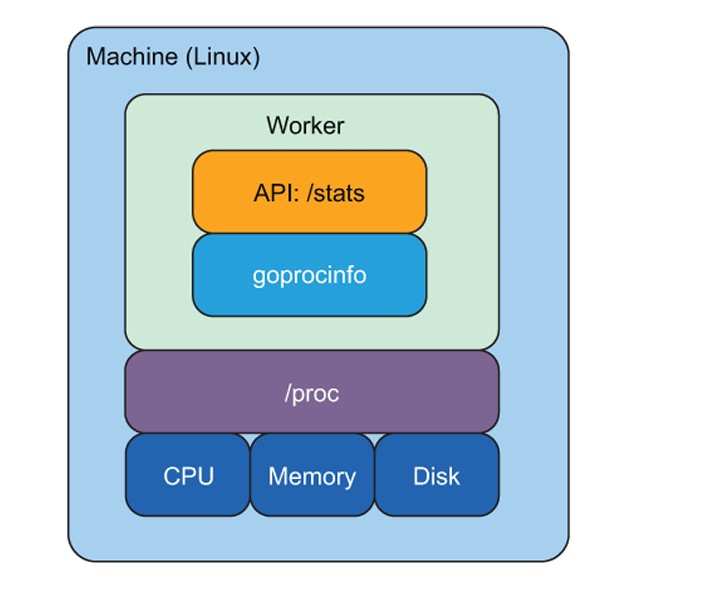
Metrics from the /proc Filesystem
On Linux systems, there’s a special pseudo-filesystem called /proc.
This filesystem exposes a huge amount of information about the current state of the system, including CPU, memory, and disk usage.
What’s nice about /proc is that it behaves like a normal filesystem:
- You can list files with
ls - You can read them with
cat
The specific files we care about are:
/proc/stat– CPU and process statistics/proc/meminfo– memory usage/proc/loadavg– system load averages
These files are the same data sources used by tools like top, ps, and stat.
Using the goprocinfo Library
Reading /proc files manually is possible, but not very fun. To make life easier, we use the goprocinfo library.
It provides convenient types and helper functions for working with /proc.
For our use case, we focus on four types:
- LoadAvg – reads
/proc/loadavg - CpuStat – reads
/proc/stat - MemInfo – reads
/proc/meminfo - Disk – reads disk-related stats using Go’s
syscallpackage
The Stats Wrapper
To keep things clean, we wrap all of this data into a single struct called Stats, defined in worker/stats.go.
The struct looks roughly like this (conceptually):
MemStats→ pointer toMemInfoDiskStats→ pointer toDiskCpuStats→ pointer toCpuStatLoadStats→ pointer toLoadAvg
This wrapper makes it easy to return all metrics at once.
Memory-Related Metrics
From MemInfo, we can extract several useful values.
We add helper methods such as:
-
MemTotalKbReturns total memory in kilobytes -
MemAvailableKbReturns available memory in kilobytes
From these, we can derive:
MemUsedKb– absolute memory usageMemUsedPercent– memory usage as a percentage
These helpers keep calculation logic out of the API layer and make the code easier to read.
Disk-Related Metrics
Disk metrics are simpler.
The Disk type from goprocinfo already gives us what we need, so our helpers are mostly pass-throughs:
DiskTotalDiskFreeDiskUsed
No extra math required here.
CPU Metrics (The Tricky Part)
CPU metrics are a bit more subtle.
When we say “CPU usage is 2%”, what does that actually mean?
On Linux, CPUs spend time in different states:
- user
- system
- idle
- nice
- and others
We can see the time spent in each state in /proc/stat, but that raw data doesn’t directly give us a percentage.
The CpuStat type from goprocinfo gives us access to these values—but not the percentage itself.
So we calculate it manually using a commonly accepted algorithm:
- Sum the values for idle states
- Sum the values for non-idle states
- Compute the total
- Subtract idle from total and divide by total
This gives us CPU usage as a percentage.
Pulling It All Together: GetStats()
Once all helper methods are in place, we wrap everything in a single function:
GetStats()
This function:
- Reads memory stats
- Reads disk stats
- Reads CPU stats
- Reads load averages
- Populates a
Statsstruct - Returns it to the caller
Note: All metrics come from
/proc, except disk stats, which use Go’ssyscallpackage under the hood.
Exposing Metrics Through the API
Now that metrics collection is in place, we expose it through the worker’s API.
There are three final steps:
- Add a method to the worker to periodically collect metrics
- Add a new API handler
- Add a new route
Collecting Metrics in the Worker
We add a method called CollectStats to the worker.
What it does:
- Runs in an infinite loop
- Calls
GetStats() - Updates the worker’s
Statsfield - Updates the worker’s
TaskCount - Sleeps for 15 seconds
This keeps metrics reasonably fresh without overwhelming the system.
The GetStatsHandler
On the API side, we add a new handler:
GetStatsHandler
This handler is very simple:
- Reads the worker’s current
Stats - Encodes them as JSON
- Writes them to the response
The handler does not calculate metrics—it just returns what the worker already collected.
Adding the /stats Route
The final API change is adding a new route in api.go:
GET /stats→ callsGetStatsHandler
Final Worker API Summary
| Method | Route | Description | Request Body | Response Body | Status |
|---|---|---|---|---|---|
| GET | /tasks |
List all tasks | None | List of tasks | 200 |
| POST | /tasks |
Start a task | JSON task.TaskEvent |
None | 201 |
| DELETE | /tasks/{taskID} |
Stop a task | None | None | 204 |
| GET | /stats |
Get worker metrics | None | JSON stats.Stats |
200 |
Running Everything (main.go)
To make this work at runtime, we add one more call in main.go.
Just like runTasks, we start metrics collection in a separate goroutine:
- Call
CollectStats()on the worker - Run it concurrently
This way:
- One loop processes tasks
- Another loop refreshes metrics
- The API simply serves current state