Orchestrator, The Manager
December 23, 2025
Why Do We Need a Manager?
Even though our system has multiple workers, we should not ask users to submit their tasks directly to a worker.
Why?
Because that would put an unnecessary burden on users. They would need to know:
- How many workers exist
- Which workers are already busy
- Which worker is best suited for their task
Instead of pushing this complexity onto users, we centralize all of this logic inside a single component: the Manager.
Single Manager Design
Our orchestrator will have one manager.
This is a deliberate design choice. It keeps the system simpler and reduces the number of problems we need to think about at this stage (leader election, consensus, split brain, etc.).
The manager allows us to clearly separate:
- Administrative concerns → Manager
- Execution concerns → Worker
This design principle is commonly known as separation of concerns.
Manager Responsibilities
Administrative responsibilities in an orchestration system include:
- Handling requests from users
- Scheduling tasks onto appropriate workers
- Keeping track of task state
- Keeping track of worker state
- Restarting failed tasks
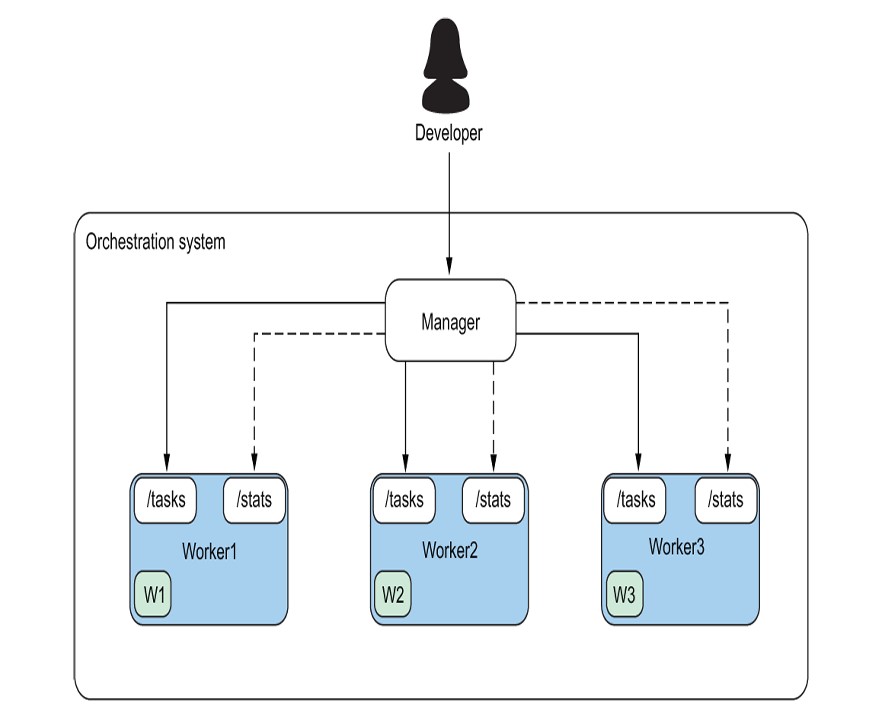
Control Plane vs Data Plane
Another useful way to think about this separation is:
- Control Plane → Manager
- Data Plane → Worker
This terminology comes from networking.
- The control plane decides what should happen
- The data plane actually does the work
In our system:
- The manager decides where a task should run
- The worker actually runs the task
Components of the Manager
The manager is composed of several internal subcomponents.
TaskDB
Like the worker, the manager maintains a task database. The difference is:
- Worker TaskDB → only tasks running on that worker
- Manager TaskDB → all tasks in the orchestration system
EventDB
The manager also maintains an EventDB.
This database stores task events rather than tasks themselves. It helps separate metadata from task state.
Examples of metadata:
- When a user submitted a task
- When a task transition was requested
Workers
The manager keeps a list of all workers in the cluster.
Each worker is represented as a string, typically in the form:
<hostname>:<port>
This corresponds to the address where the worker’s API is running.
Task Queue
Just like the worker, the manager also has a queue.
- The queue represents pending task events
- Tasks enter the system here before being scheduled
API
Finally, the manager exposes an API that users interact with.
Users never talk to workers directly — they only talk to the manager.
The Manager Struct
Putting all of this together, the manager struct looks like this:
type Manager struct {
    Pending       queue.Queue
    TaskDb        map[uuid.UUID]*task.Task
    EventDb       map[uuid.UUID]*task.TaskEvent
    Workers       []string
    WorkerTaskMap map[string][]uuid.UUID
    TaskWorkerMap map[uuid.UUID]string
}
A few important mappings here:
-
WorkerTaskMap Worker → list of tasks running on that worker
-
TaskWorkerMap Task → worker running it
These maps make it easy to answer questions like:
- “Which worker is running this task?”
- “Which tasks are running on this worker?”
Core Manager Methods
We implement the manager in stages. The main methods are:
SelectWorkerSendWorkUpdateTasks
SelectWorker: A Naive Scheduler
At this stage, the manager is the scheduler.
The SelectWorker method chooses a worker from the Workers list.
We start with a round-robin algorithm:
- Pick the next worker in the list
- Move forward one index each time
- Wrap around when we reach the end
To support this, we add one more field to the manager:
LastWorker int
This field stores the index of the last worker that was selected.
The algorithm works like this:
- Select
Workers[LastWorker] - Increment
LastWorker - If we reach the end, reset to
0
Simple, but good enough to start.
SendWork: The Workhorse Method
SendWork is where most of the manager’s logic lives.
Its responsibilities are:
- Check if there are task events in the pending queue
- Select a worker
- Pull a task event from the queue
- Set the task state to
Scheduled - Update internal bookkeeping maps
- JSON-encode the task event
- Send the task to the selected worker
- Check the worker’s response
The method begins by checking:
- Is
Pendingqueue non-empty?
If yes, we proceed.
Sending Work to a Worker
Once a worker is selected, the manager builds the worker’s API URL using:
<hostname>:<port>
Then it sends the task event using an HTTP POST request via Go’s net/http package.
At this point:
- The manager has delegated the task
- The worker is responsible for execution
UpdateTasks: Syncing State from Workers
A successful HTTP response from a worker only means:
“The worker accepted the task.”
It does not mean:
- The task started successfully
- The task is still running
- The task didn’t fail immediately
Because of this, the manager must periodically reconcile state.
That’s the job of UpdateTasks.
How UpdateTasks Works
For each worker in the cluster:
- Send a
GET /tasksrequest to the worker - Decode the response (list of tasks)
-
For each task:
- Compare worker state with manager state
- Update manager state if they differ
- Update
StartTime - Update
FinishTime - Update
ContainerID
In this design, workers are the source of truth for task state.
The manager simply reflects what workers report.
Additional Manager Methods
AddTask
This method should feel familiar.
Just like the worker’s AddTask, it:
- Adds a task event to the manager’s queue
This is how new work enters the system.
Creating a Manager
Finally, we create a helper constructor:
New
This function:
- Accepts a list of workers
-
Initializes:
- TaskDB
- EventDB
- WorkerTaskMap
- TaskWorkerMap
- Returns a pointer to a fully initialized manager
This keeps setup logic clean and centralized.
Thinking About Failures and Resiliency
At this stage, even though the manager can select a worker from a pool and send it a task to run, it isn’t really handling failures. The manager is mostly acting as a recorder of facts, tracking the state of the world inside its TaskDB.
What we’re slowly moving toward, however, is a declarative system.
In a declarative system, the user doesn’t tell the system how to run a task. Instead, the user declares the desired state of a task, and the system’s responsibility is to make a reasonable effort to reach that state.
Right now, “reasonable effort” simply means trying once to bring a task into the desired state. That’s clearly not enough for a production-grade system, but it’s a good starting point. We’ll revisit failures, retries, and resiliency in more depth later.
Putting It All Together
So far, we’ve mostly focused on running a worker in isolation. Now it’s time to put the bigger picture together.
In main.go, we want to run both a worker and a manager.
Running a manager by itself doesn’t make sense — a manager only exists to coordinate one or more workers. So from this point onward, both components need to run together.
Running the Worker Concurrently
We start by launching the worker-related processes.
- We call
runTasksin a goroutine using thegokeyword. - We start another goroutine to call the worker’s
CollectStats()method, which periodically gathers metrics from the machine the worker is running on.
Next, we start the worker’s API server.
Here’s an important change: instead of calling api.Start() directly in the main goroutine, we launch it in another goroutine. This allows the worker to:
- Process tasks
- Collect metrics
- Serve API requests
all at the same time.
Starting the Manager
Once the worker is up and running, we create an instance of the manager.
We begin by creating a list of workers and assigning it to a variable called workers. This is simply a slice of strings. For now, it contains only one entry: the single worker we just started.
Next, we create the manager instance by calling the New function we defined earlier and passing in this list of workers.
Submitting Tasks Through the Manager
Here’s a key shift in how the system works.
Instead of adding a TaskEvent directly to the worker, we now:
- Add the task event to the manager using
m.AddTask(te) - Call
m.SendWork()
The SendWork method selects a worker (currently the only one available) and sends the task event to that worker using the worker’s API.
This small change is important:
all task submissions now flow through the manager, not directly to workers.
What Just Happened?
Let’s pause and recap what the system is doing:
- We created a worker, and it is running and listening for API requests.
- We created a manager with a list containing that single worker.
- We created three tasks and added them to the manager.
- The manager selected a worker and sent those tasks to it.
- The worker received the tasks and attempted to start them.
At this point, tasks are running (or at least attempting to run) on the worker.
Keeping the Manager in Sync
Once tasks have been sent to workers, the manager still has work to do.
We call the manager’s UpdateTasks method so it can:
- Query workers
- Fetch the current task states
- Update its internal view of the system
This step is critical because the manager treats workers as the source of truth for task state.
Observing State Changes
To make things easier to observe, we add another infinite loop.
This loop:
- Iterates over all tasks known to the manager
- Prints each task’s ID and current state
As UpdateTasks runs, we can visually see tasks transitioning between states.
To run this loop concurrently, we wrap it in an anonymous function and launch it in a goroutine. This pattern is very common in Go and makes it easy to run background logic without blocking the rest of the program.
At this point, the system finally starts to feel alive.
The manager coordinates, the worker executes, and state flows continuously between them.